


Refreshed and republished on October 4, 2020
This post was originally published on February 25, 2016 and has been revamped and updated for accuracy and comprehensiveness.Pardot offers 2 methods for embedding forms on your website; embedding using an iframe, and form handlers. While the embedded iFrame forms allow marketers to have control over updating and configuring the forms, using an iFrame isn’t always ideal for website usability. In this tutorial, I will show you how to take advantage of the Pardot iFrame forms and make it look great embedded on your website.
Why Use Embedded Pardot Forms?
Using Pardot forms over Pardot form handlers have many benefits including:
- Allowing for progressive profiling
- Built-in email validation
- The ability to use the drag and drop editor to modify form fields
- Add/remove form fields easily and have the changes show up on your website instantly
Embedding Pardot forms on your website
The problem
The embedded Pardot form (which is in an iFrame) has to have a set height. This means that when you embed the form you have to calculate the height (in pixels) and update the code Pardot provides accordingly.
Example
If you add any additional fields to the form, the height of the form will need to change. You also need to accommodate for the built-in validation messages which can cause the height of the form to change as well.
The solution
Automatically resize the iFrame using Javascript. Even if you’re not a developer, it’s pretty easy to implement since is just copy and paste.
Step 1: Add some code to your Pardot form
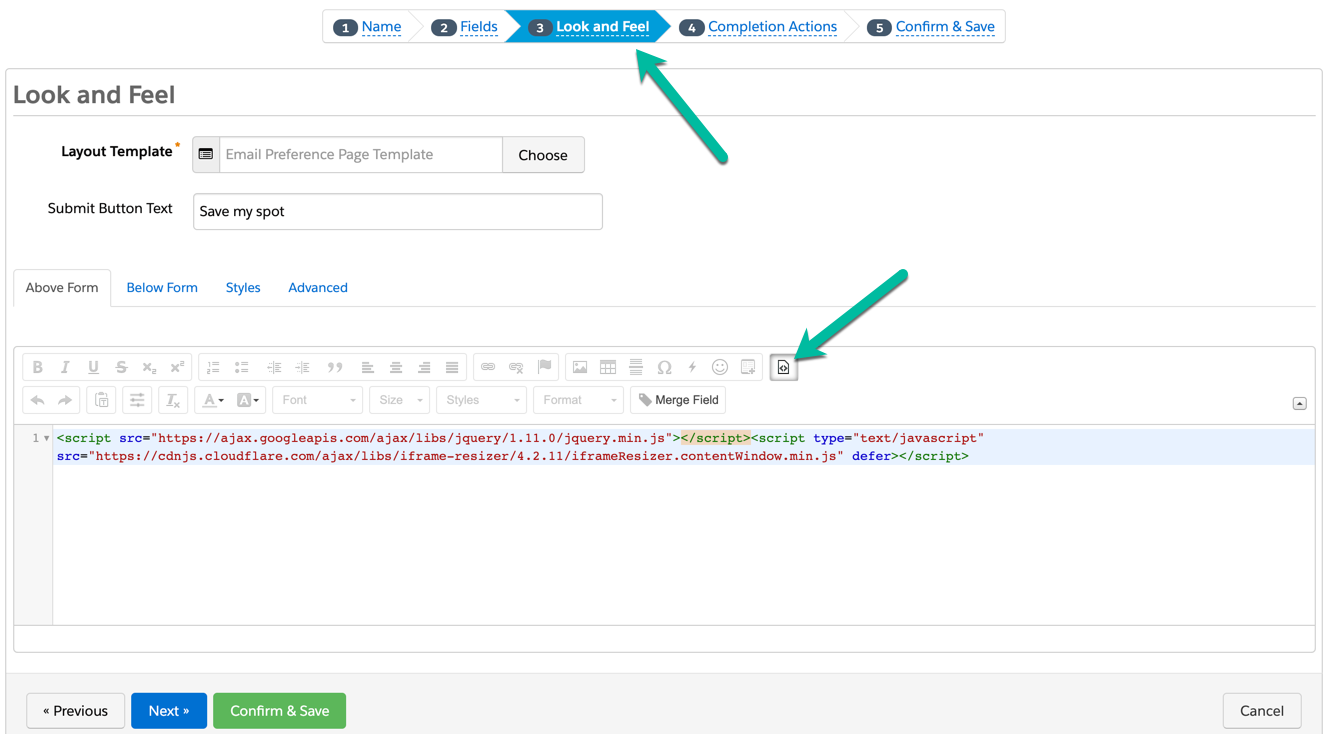
Navigate to your form in Pardot and paste this code in the look in feel section by clicking on the HTML icon.
Step 2: Download the plugin and add jQuery
Download this file and link the javascript on your website. Or link this hosted verison on your website like this and add the jQuery plugin.
Step 3: Embed the form on your website
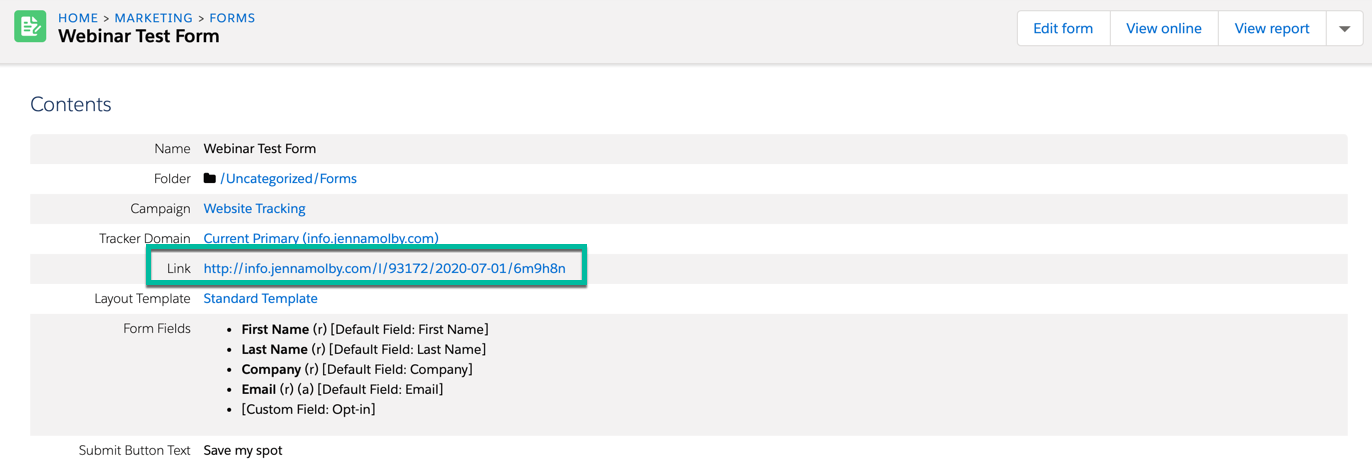
In order to embed the Pardot form on your website, you will need to grab the form URL from Pardot. Navigate to the form overview page and copy the link provided
Add this piece of code where you want the form to appear on the page. Replace the URL with the URL you copied above.
Lastly, add some custom javascript to your website to initiate the iFrame resizing.
Here’s the completed website code:
Pardot iFrame Resizing
That’s it!
Your embedded Pardot form should now adjust based on the content. Have questions? Send me a tweet @jennamolby, leave a comment below, or book a Peer Chat.

48 Comments
Loving your blog, its a gold mine for great ideas!
Regarding Pardot forms, I’m torn between the iframe and form handler options.
The first doesn’t look good on our site and has trouble picking up the UTM trackers from the parent window.
The latter doesn’t allow to pre-populate fields or even “remember” returning users.
This is quite upsetting because it’s rather standard in Marketo/Hubspot, and I feel that either way I’m losing a major part of the usability a user is expecting to get on our site.
How do you recommend bridging this gap?
Hi Elad, thanks for the great feedback about my blog. I agree with you, there are trade-offs for both form methods. I usually recommend that any forms embedded in your website (contact us forms, newsletter sign up, etc) use the form handlers since it’s easier to have them match your website style and to use the form embeds on Pardot landing pages for your demand generation pages (eBooks, webinars, events, etc). Hope that helps!
Our page is still loading with a space underneath the form. Is there a way to make the space smaller or set an initial height of the form and still have the iframe auto expand?
It looks like its trying to account for the space of our dependent fields.
Hi Matthew,
Did you figure out how to do this? I am having the same issue 🙁
Hi Kristin, Gating content on a page is a little bit different than a popup form on the click of a button. I explain how to gate a page with a Pardot form here: https://jennamolby.com/how-to-use-a-pardot-form-to-gate-content-on-a-page/. Cheers!
Is there a way to add raw HTML of the form and style it on my landing page rather than using iframe?
Thanks.
Hi Anton, You can use a Pardot form handler instead of an iFrame. This will allow you to use your own HTML/CSS and still submit the data to Pardot. Check out this post: https://jennamolby.com/how-to-use-pardot-form-handlers/ for more information.
Works great! Thank you!
This is great information but “the right way” is probably a stretch because using iFrame’s is bad practice from an accessibility point of view.
You’re completely right! However, if you’re going to choose this option for embedding forms, might as well do it “the right way” by resizing the iframe to match the window height.
That’s some neat JS too, I’ll have to have a play around with it! Had not seen that done, cheers.