

Can my Pardot email be responsive? Why doesn’t my background image appear in Outlook? Can Pardot emails be drag & drop? I get asked these questions a lot from Pardot users and see them posted frequently in the Trailblazer Community. Let’s dive into these questions as well as other common Pardot email template questions.
Does Pardot allow responsive email design?
Yes, Pardot emails can be responsive, but you have to set up your template with the correct code. This means that you have to have media queries within your email or use one of the scalable or fluid methods.
If you’re new to email development or responsive email development, here are some resources to get started.
- How to Code a Responsive Email From Scratch
- Creating a Simple Responsive HTML Email
- Responsive Email Patterns: A collection of patterns & modules for responsive emails
How do I create editable sections that can be dupliated, deleted and reordered?
By default all sections of your email template are editable. This isn’t ideal for a couple of reasons:
- It allows the users of the template to modify everything, including the logo, footer, copyright, etc.
- It can cause part of the HTML to be stripped out or break within the email editor
With that in mind, I always try to “lock down” elements that don’t need to be modified.
An editable section can be created by adding this tag to your DIV, TD, TABLE or TR elements.
pardot-region="my-text"
A section that can be duplicated, removed or reordered can be created by adding this tag to your DIV, TD, TR, or TABLE elements.
pardot-region="my-section"
How do I make my background image appear in Outlook?
The standard CSS for background images does not work in some email clients including Outlook 2000 – 2003, Outlook 2007 – 2016 and others listed here. Luckily there’s a workaround to get your background images working in all email clients by using this Bulletproof Background Image Generator.
How do I create a button?
Use my Bulletproof Pardot Button Generator to create beautiful buttons for your Pardot emails, without VML. Simply select your button colors, fonts, font sizes, padding, etc and copy and paste the generated HTML into your Pardot email or Pardot email template.
How do I use a custom font within my email?
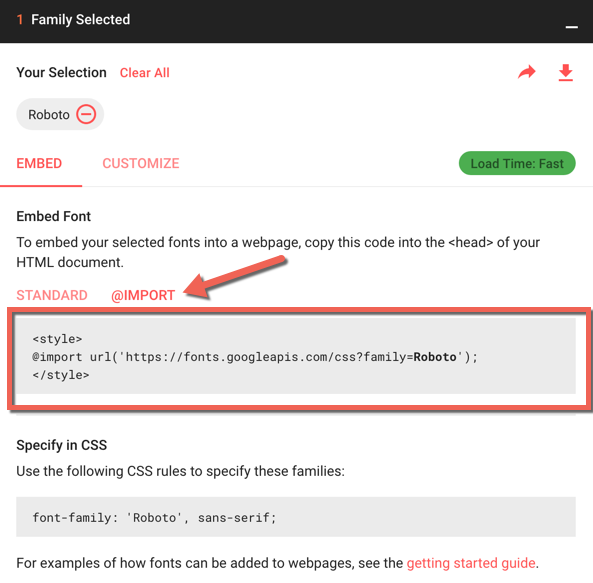
The best way is to select a custom font from the Google Font Library. Once you have selected your fonts, select the @import method, and copy and paste the code provided into your email template.
Recommended resources
- The Ultimate Guide to Web Fonts
- All You Need to Know About Web Fonts in Email
- Use Custom Fonts in Pardot
- Fonts being tracked as email clicks
Can my Pardot email template be “drag & drop”
No, Pardot doesn’t currently have this functionality. There’s an idea in the Success Community for it, go vote!
In the meantime, if you require that functionality, check out BEE Free. A drag & drop email creation tool. No signup required.
Is there a way to customize the text within the preview on mobile or Gmail?
Yes! This is called a email preheader and can be added to your Pardot template by placing this HTML to right after the opening BODY tag.
Can I embed a video within a Pardot email?
Embedding videos within an email, in general, isn’t widely supported. If you’re feeling ambitious you can check out this article from Email on Acid, which dives into the different email clients that will support it and a fallback solution for those that do not.
Otherwise, I recommend taking a screenshot of your video frame, overlaying a play button and making the whole image clickable, which directs to the landing page containing the video.
Why is the plain-text version of my email not formatted correctly?
Sometimes when you click the sync from HTML button the plain-text version populates with a bunch of spacing and indentation. I recommend using this HTML to text converter to generate a clean, formatted version of your plain-text email.
What Pardot email questions do you have?
Send me a tweet @jennamolby, leave a comment below, or book a Peer Chat.

28 Comments
Hello Jenna,
I am trying to create a new email template and am having some issues with the CSS.
I would like to define my CSS rules (H1, H2, links…) in the like this:
…
h1{
color:blue;
font-family: ‘Roboto’, sans-serif;
font-size: 22px;
}
Hello
…
But it does not appear when I send my email, the content does not change.
I have to put the rules in each element like this:
Hello
And then it works.
Do you know if there is a way to define these parameters somewhere in Pardot like a general rule?
Hi Louise, Yes, some email clients require inline CSS vs CSS in the header of the email. My guess is that your testing your email using one of the email clients that doesn’t support CSS in the header for h1 tags.
Hello Jenna, thank you for your answer! Okay, I was hoping that the problem was with Pardot, in which case I’ll continue to do it that way to adapt to all email clients.
Hello hello, I’m struggling to find any information on how to remove the border (or at least minimize the size) that surrounds the margins of Pardot emails. How can I do that?
Please tell me it’s possible!
Hi Natalie, It’s hard to tell what the issue might be without reviewing your code. All the tables in your emails should start like this
Hi Jenna!
For emails, why does my text look smaller on mobile compared to on desktop? How can I fix this?
Hi Emma, You might have a media query set up to decrease the font size on mobile. Here’s what that might look like: https://www.w3schools.com/css/css_rwd_mediaqueries.asp
Jenna, I am struggling SO much with the new pardot landing page builder. In theory, sure it’s great, drag-and-drop. But it lacks so many features. For example, I would have liked a background image, a special header hero image. And there is NO way I can figure out to do this. Your tutorials are absolutely amazing and would love to see something that would help achieve this on the new builder.
Hi Jessica, I agree it’s lacking in many features. Hopefully, in upcoming releases, we will see some more features. In the meantime, I plan on posting a lot more about tips/tricks for the landing page builder soon.
Hi Jenna and all!
Has anyone had any luck with being able to change a background image through the editor using regions? Or is there another way to do it? I’m trying to make emails as editable as possible for my marketing team without them having to delve into the HTML but this one is stumping me!
Thanks!
Stephen
Hi Stephen, Unfortunately the only way to change the background image within an email is to delve into the HTML.