One of my favourite Lightning features is customizing the campaign page using the Lightning App Builder. The drag-and-drop App Builder allows you to add tabs, reports and instructions to your page. While there are many different ways to customize your campaign page, here are four changes that are easy to implement that will delight your marketing team.How to customize your campaign pageTo customize your campaign page, navigate to one of your Salesforce campaigns, click on…
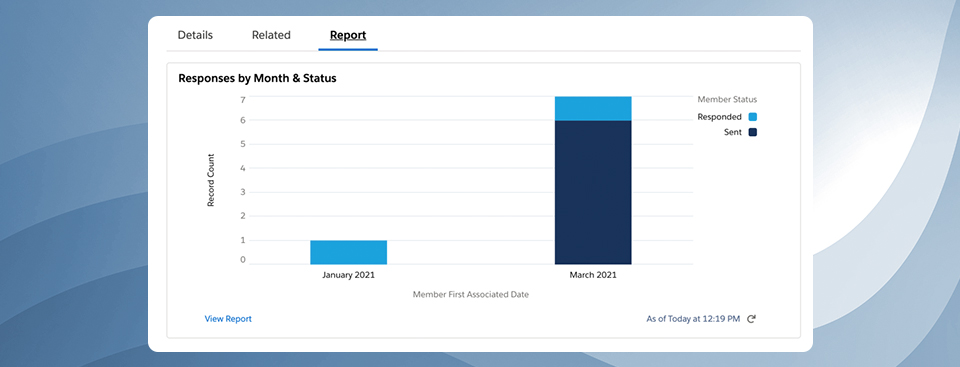
Did you know you can add report charts to your campaign page layout in Salesforce? Adding report charts will give you insight into a particular campaign’s performance without creating a separate report or leaving the campaign page. These reports can show you how many campaign members were added, by month or by status, how many opportunities are influenced by the campaign by opportunity stage, etc. All this is made easy by customizing your campaign lightning…
Want to know how many accounts or companies attended an event, webinar or interacted with a marketing campaign? This metric can be difficult for marketers to pull in Salesforce because reports by default will show the number of leads, contacts or campaign members within a report. One solution is to use the “Power of One” hack, which involves creating a custom field for accounts. The other easier solution is to use the “show unique count”…
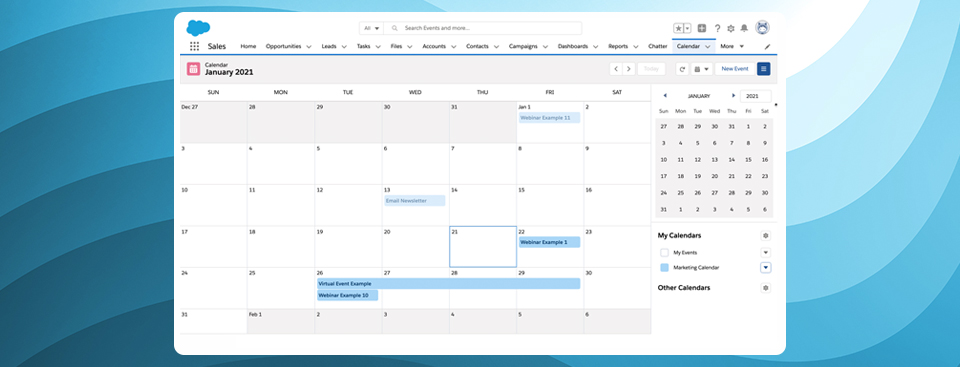
Did you know you can create a calendar based on any custom object in Salesforce – without using an app? Yes, this applies to the campaigns object as well. While there are a couple of limitations to using this feature, it’s a great way to get a view of all your campaigns in a campaign view without purchasing an app from the Salesforce App Exchange.LimitationsBefore diving into how to create a campaign calendar, there is…
Bulk creating campaigns in Salesforce is a great way to plan your marketing initiatives for the month or the quarter. You can upload your campaign targets as custom fields, set your estimated pipeline, and create Salesforce reports for visibility into your marketing campaigns. Uploading campaigns in Salesforce can be done using Salesforce Data loader. All you need to do is prep your CSV file and upload it into Salesforce.
Salesforce campaigns can help you track each of your marketing initiatives in detail. These can include online advertisements, emails, or more specialized marketing events such as demos and tradeshows. You can use campaigns to analyze how many leads you are generating, how much pipeline you are building, and how many deals are closing as a result of your marketing efforts. However, in order to track and analyze your campaigns effectively, you need to have an organizational structure in place. Whether you are setting up campaigns for the first time or looking for a way to get more out of campaigns, here are 7 tips to help you get started with your campaign organization.